Seedance 2.0 is here — multi-reference cinematic video, right on your iPhone. Get the app →
Powered by Seedance 2.0

Turn ideas into
cinematic videos

Seedance turns your images, clips and words into stunning AI-generated videos — with true multi-modal reference control, right from your iPhone.

  • ✦ Up to 12s per clip
  • ✦ 7 aspect ratios
  • ✦ Audio generation
  • ✦ HD output
  • ✦ Your videos stay yours
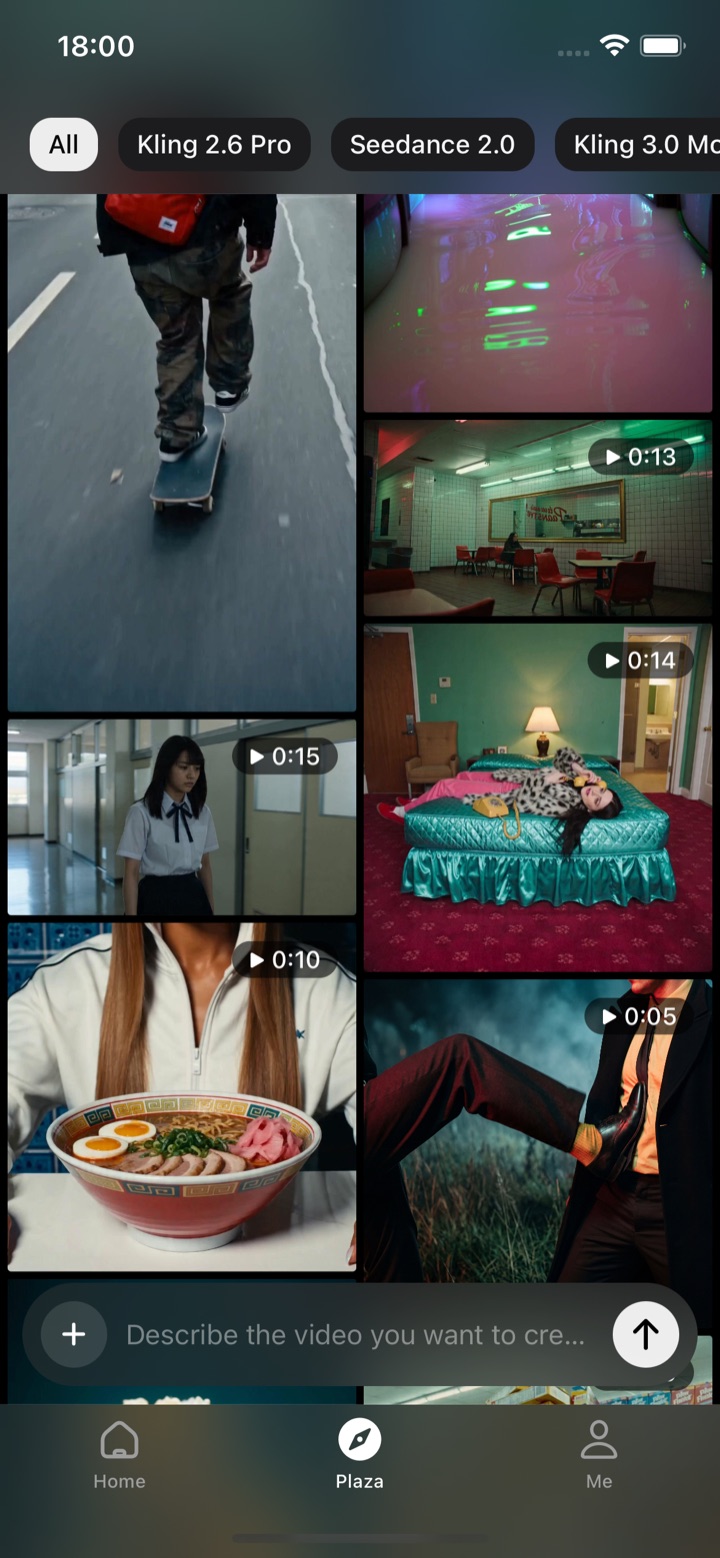
Seedance app — the Plaza feed of AI-generated videos

One app, every way to create

From a line of text to a finished cinematic clip — Seedance does it all.

Every top model, one app

Switch between the world’s best video models — no juggling subscriptions.

Seedance 2.0

Our flagship — multi-reference cinematic video.

HD12sAudio9 refs

Kling 2.6 Pro

Crisp, photoreal motion with strong consistency.

1080pImage→VideoCinematic

Kling 3.0

Next-gen motion and camera control.

4KMotionReference

Veo 3.1

Fast, audio-native generation by Google.

AudioFastCinematic

Sora 2

Hyper-real scenes with believable physics.

Realistic1080p

Wan 2.7

Versatile image-to-video at speed.

HDImage→Video

Get Inspired

Every clip below was generated with Seedance — straight out of the app, untouched.

Loading the latest creations…

Key Features of Seedance 2.0

A truly controllable multi-modal AI video model — reference anything, edit anything, create anything.

Multi-Modal Input

Bring up to 9 images, 3 video clips (15s combined) and 3 audio tracks into one generation. Mix text, pictures, footage and sound however your idea demands.

Reference Anything

Borrow motion, effects, camera moves, characters, scenes or sounds from any upload — point at it in plain language and the model gets it.

Superior Consistency

Faces, outfits, lettering, scenes and style stay locked from the first frame to the last — no character drift, no style wobble.

Precise Motion & Camera Replication

Hand the model a reference clip and it mirrors the choreography and cinematic camera work — no elaborate prompting required.

Video Extension & Editing

Extend a shot, stitch clips together, or rework a single segment — swap characters, add elements, change actions while the rest stays put.

Built-in Audio Generation

Scene-aware sound effects and music, generated automatically — or sync your visuals to a track you upload.

How it works

From materials to motion in three steps.

1

Upload your materials

Photos, video clips, even a soundtrack — everything becomes a reference.

2

Describe with @mentions

Type @ to reference uploads precisely: “@Image1 as first frame, surfing on the sea…”

3

Generate & share

Cinematic video in minutes, with audio. Saved to your library, ready to share.

Made for every kind of video

From social clips to commercials — create it with Seedance 2.0.

Social media

Vertical Reels, TikToks and YouTube Shorts, plus trending effects.

Marketing & ads

Product videos, brand content and commercial spots.

Music & dance videos

Music videos, dance covers and beat-synced clips with audio.

Storytelling & film

Short films, pre-visualization and storyboards.

Education & tutorials

Course content, demos and visual lessons in motion.

Real estate & product

Property tours, virtual staging and product showcases.

Simple credit pricing

Start with free credits when you join. Pay only for what you generate — no subscription required.

Join free at launch

Frequently asked questions

Everything about creating AI videos with Seedance.

What is Seedance?

Seedance is an AI video generator app for iPhone that turns your images, clips and words into cinematic videos, powered by the Seedance 2.0 model.

How do I turn a photo into a video?

Upload your photo in the app, describe the motion with an @mention (e.g. “@Image1 as the first frame, slow push-in”), then tap generate — Seedance returns a cinematic clip in minutes.

What is multi-reference video generation?

You can bring up to 9 images, 3 video clips and 3 audio tracks into one generation and point at any of them in plain language to borrow their motion, camera moves, characters, scenes or sound.

Can I use a reference video to control motion and camera?

Yes. Hand Seedance a reference clip and it mirrors the choreography and cinematic camera work, so you don’t need elaborate prompting.

What aspect ratios, length and quality does Seedance support?

Up to 12 seconds per clip, 7 aspect ratios (including 9:16, 1:1 and 16:9) and HD output, with built-in scene-aware audio generation.

Is Seedance free?

You start with free credits when you join and only pay for what you generate — no subscription required.

Can I extend or edit a video I already made?

Yes — extend a shot, stitch clips together, or rework a single segment (swap characters, add elements, change actions) while the rest of the frame stays put.

How does Seedance keep characters and style consistent?

Faces, outfits, lettering, scenes and style stay locked from the first frame to the last — no character drift or style wobble across the clip.

Do my generated videos stay private?

Yes — your generated videos are yours.
Join the creators making video with Seedance

Trusted by creators and teams around the world.

Start free
500K+
Creators
2M+
Videos created
6
Top AI models
4.8★
App Store rating

What creators say

Cinematic AI, finally on my phone

I describe a scene and Seedance hands me a clip that actually looks like a film. The multi-reference control is unreal.
Maya R.

My whole workflow, in one app

I used to juggle three tools. Now it's text, image or clip in — finished video out. Saves me hours every week.
Devin K.

The consistency is the magic

Faces, outfits and scenes stay locked across the whole shot — no drift. That's what sold me.
Lena P.

Built for creators with big ambitions

From a solo creator to a full team — scale your output without scaling your effort. One idea, endless cinematic clips.

Start creating now